Know what needs attention.
Review approaching, overdue, and blocked work by school or caseload within your authorized access. Use role-based priorities to guide check-ins and focus support.
School JAWN. Just Add What’s Needed.
Less paperwork. More room in your budget.
Unlimited students, student accounts, and parent accounts in both plans. No extra student or parent account fees.
We built School JAWN to help districts spend less on software and give staff more time for students. Connect IEP writing, meetings, timelines, services, and progress monitoring in one workspace.
Prefer to talk? Book a district demo ↗Pennsylvania districts: ask about a free pilot for the 2026–2027 school year. Two check-ins during the year, plus an end-of-pilot review. Share feedback and requests with Dan and Fran anytime.
 School JAWN
MY CASELOAD
Plans, progress, and the work ahead.
An example with connected tools enabled. Actual access follows your school and role.
GIVE YOUR TEAM TIME BACK
A document hunt. An unresolved meeting question. Another check for missing information. School JAWN is built to reduce that extra work and make the day feel more manageable.
More time for teaching. More breathing room for staff. That’s the goal behind the connected workspace: fewer administrative interruptions between your team and the work they came to do.
See a simpler workday ↗FOR SPECIAL EDUCATION DIRECTORS & DISTRICT LEADERS
Your responsibility spans students, staff, schools, and budgets. School JAWN brings the work into view so you can focus your attention and support where it matters.
Review approaching, overdue, and blocked work by school or caseload within your authorized access. Use role-based priorities to guide check-ins and focus support.
Give teachers, providers, and administrators a clear place to start. Connected records, next steps, and follow-ups help reduce the searching and chasing that add to staff workload.
Review missing required information, retained meeting follow-ups, document versions, and service documentation. Bring the relevant records into conversations about what happens next.
Our goal is to save districts money. The full system is $120 per staff user annually, equivalent to $10 a month, with unlimited students, student accounts, and parent accounts. Compare that with your current software bill, the tools you would still need, and the time your team spends repeating work. Let’s demonstrate the workflows before you decide.
Compare your district’s needs ↗LESS COORDINATION WORK FOR YOUR SUPPORT STAFF
Give the people keeping everything moving a shared view of the steps, documents, and signatures, so the next action is easier to find.
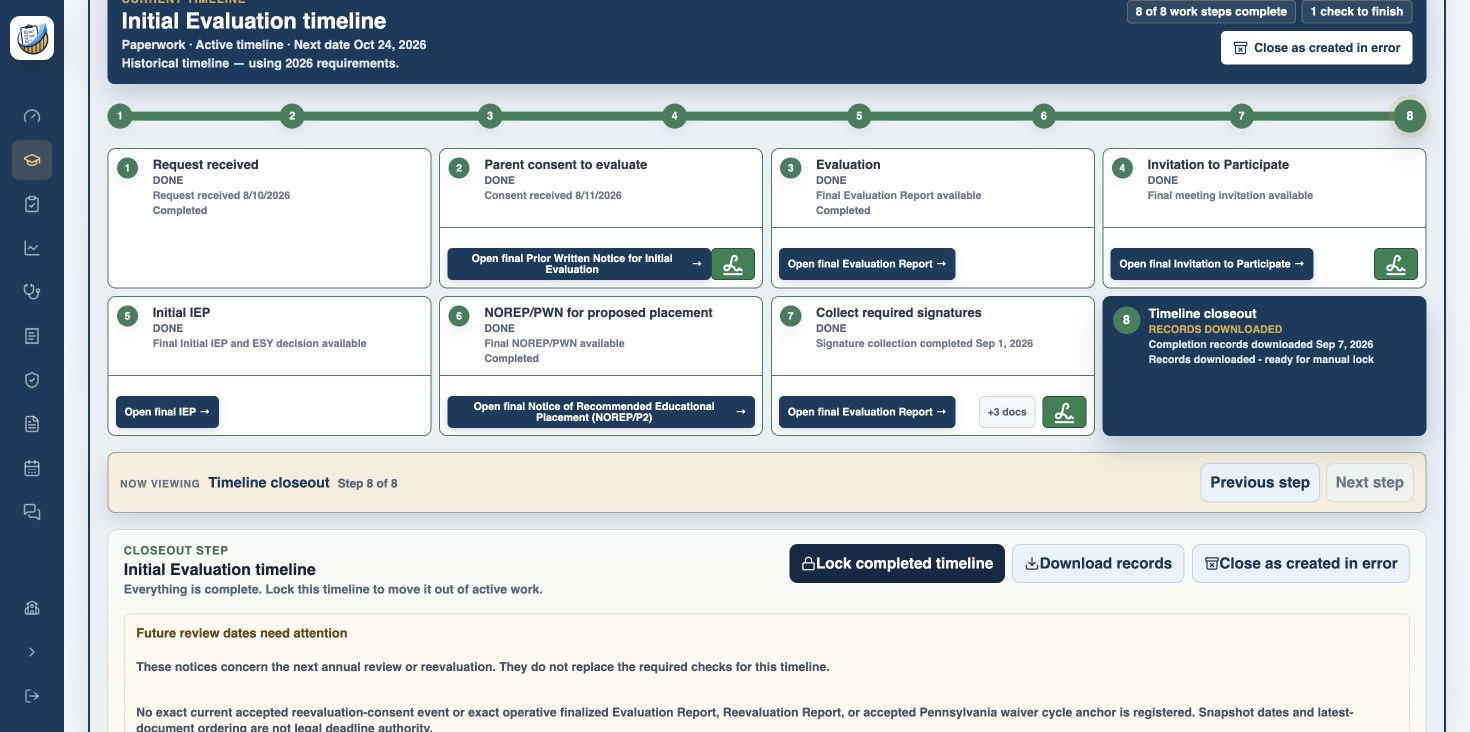
Actual timeline screen from our demonstration. Earlier branding appears in the interface. Open the image for a closer look.
Follow the evaluation workflow from the initial request through consent, the IEP, signatures, and retained records. Open the associated final documents from the timeline.
After staff sends the initial signature request, enabled automatic follow-ups send reminder emails for eligible unsigned requests. Staff can review recorded attempts and see when personal follow-up is needed.
Keep outstanding signatures, recorded responses, and next steps with the workflow. Give authorized support staff a clearer starting point when helping the team move paperwork forward.
LESS PIECING THINGS TOGETHER
Write the plan, work through the meeting, coordinate support, and measure progress in connected student workflows.
Review the IEP together and capture live meeting notes alongside the relevant page. Keep questions and follow-ups connected to the discussion.
Explore the connected workflow ↗Connect evaluation and IEP timelines to consent dates, required records, and next actions. Built-in readiness checks flag missing required information so teams know what needs attention.
Follow the next step ↗Bring provider schedules, service notes, and review workflows together so teams can follow the work from planned services to recorded sessions.
See service coordination ↗Collect IEP goal data, follow trends, and create progress reports. Bring a clearer picture of student growth into the next team conversation.
Explore progress monitoring ↗Connect progress visibility with authorized document sharing, family feedback, and signature requests as your school enables those tools.
Explore family collaboration ↗Caseloads for teachers. Schedules for providers. School oversight for administrators. Keep responsibilities visible within each person’s authorized workspace.
Find your team’s fit ↗BUILT FOR THE MOMENTS THAT MATTER
Keep the team’s discussion, family responses, and student supports close to the work they belong to.
Capture discussion alongside the IEP page it concerns. Revisit open questions, record follow-up resolutions, and retain the original note so the team can follow what happened.
Meeting notes stay separate from the finalized IEP.
Share documents with authorized families, collect responses and signatures, and retain them with the exact document version. Keep finalized records distinct from working drafts so the team can find the record behind a decision.
See specially designed instruction and related services from the student’s current finalized IEP without searching through the entire document before every conversation.
ONE PLATFORM. YOUR STARTING POINT.
Bring IEP planning, timelines, services, and progress monitoring into your school’s connected experience. Or begin with progress monitoring alone. Both belong in School JAWN.
What you see follows your school’s enabled tools and your role. The workspace stays focused on the work you can do.
Let’s find your fitStart with the work your team needs most: IEP planning, service coordination, or progress monitoring.
Connect documents, timelines, and service workflows as your school enables them.
One name. A familiar place to work. The right tools for each person.
Tell us how your team works today and what you need next.
Tell us you’re interested in a pilot ↗GET A FEEL FOR THE DAILY WORK
See how student goals, data collection, and reports fit together in a guided walkthrough.
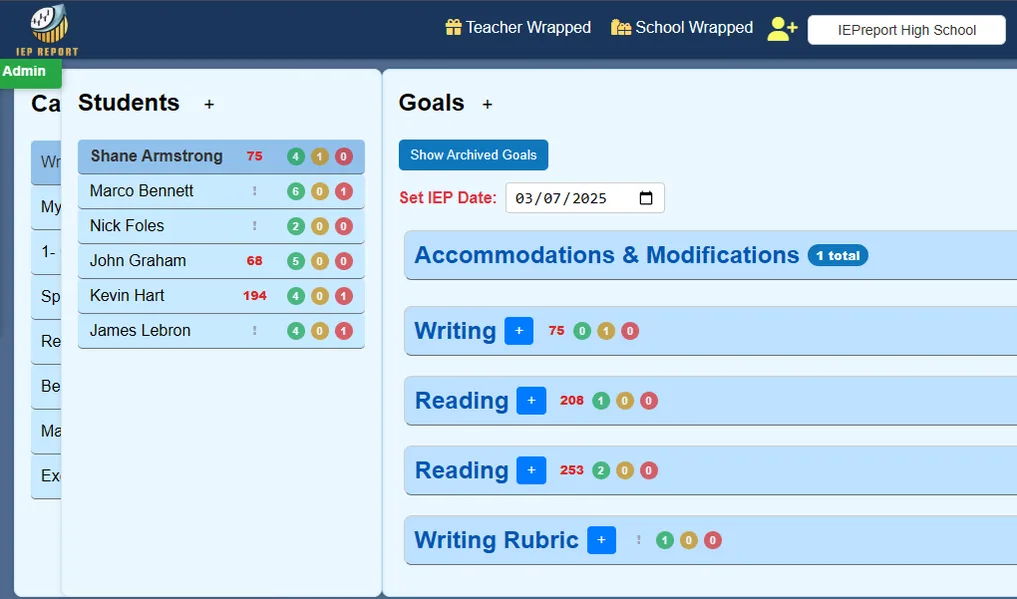
An example of the School JAWN progress-monitoring workspace.
Talk with us about how your teachers and families could use the progress-monitoring tools.
I’m interested in the pilot ↗
ROOTED IN PENNSYLVANIA
YES, IT’S A PHILLY THING.
Around Philly, “jawn” is a word for just about anything. For us, it has a purpose: Just Add What’s Needed.
We’re Dan Ganz and Fran Boyle, active special education teachers who know what it takes to manage a caseload, collect meaningful data, and prepare for the next meeting. School JAWN grows out of that work. We built it to give educators a clearer way through the paperwork, keep teams connected, and leave more room for students. We build around the questions we face ourselves: Where is the right document? What still needs a signature? What does the team need before the meeting? A more manageable day for teachers and support staff is part of the purpose, too.

Dan brings more than 20 years of special education experience to School JAWN. He helps shape tools for managing caseloads and understanding student progress, giving educators more time to support students.

Fran combines his experience as a special education math teacher with full-stack software development. He builds the connected workflows behind School JAWN, bringing classroom knowledge to the way teams plan, document, and track student support.
A DISTRICT DECISION DESERVES REAL ANSWERS
Reporting. Support. Transfers. Changing requirements. A useful demonstration starts with the work your district needs to trust.
Connect provider records, service documentation, and billing-review readiness. Walk through your service areas and reporting needs with us, from the recorded session to the evidence behind a billing review.
For Medicaid billing assistance and related-service reporting, bring your required outputs. We’ll identify what is supported and what needs validation before your district relies on it. A billing review is not a guarantee of claim acceptance or reimbursement.
Dan and Fran are active special education teachers as well as the founders behind School JAWN. Bring a question, a difficult workflow, or a suggestion directly into the conversation.
During pilot planning, agree on the support contact, available hours, and escalation process your staff will need.
Talk with Dan & Fran ↗The best feedback comes from people doing the work. Tell us what is helping, where staff still repeat steps, and which changes would make the biggest difference.
Pilot teams agree to two check-ins during the year, plus an end-of-pilot review with Dan and Fran. Feedback, questions, and feature requests are welcome anytime.
School JAWN connects the existing IEP Report progress-monitoring experience with document and timeline workflows. Keep familiar progress work in the conversation as you explore the wider system.
For incoming IEPs from other systems, review a de-identified sample and the proposed import process with us. Direct IEP Writer-to-School JAWN transfer is not an established integration.
Pennsylvania document workflows use versioned templates and state-specific rules, with retained final documents kept distinct from later changes. Assessment choices, including PASA, belong in that state-specific review.
Ask us to demonstrate the current form version and assessment behavior your team needs, and discuss how requirement changes will be reviewed.
Role-based access, authorized family sharing, retained document versions, and audit history are part of the product’s design. Your district should be able to review those controls alongside the work staff do.
Bring your WCAG, security, and data-protection requirements to the pilot review. Product features are not a claim of completed district approval or independent accessibility certification.
FROM THE PEOPLE DOING THE WORK
Real feedback about IEP Report, the progress-monitoring tools within School JAWN. These quotes describe that experience, not a review of every feature in the full system.
“IEP Report has completely transformed how I track student progress. The time I save on paperwork lets me focus more on teaching and supporting my students. It's a game-changer!”
“IEP Report is such an amazing resource for me as an English teacher and a Special Education Teacher, because it helps me track the progress of targeted writing goals that are truly individualized for each student.”
“Before using IEP Report, I was spending too much time pulling progress data together from different places before each reporting period. Having the data, graphs, and reports in one system makes the whole process faster and much less stressful.”
“What stood out to me was how easy it was to start with my own caseload. Once I saw how much time it saved and how much cleaner my reporting workflow felt, it became much easier to explain the value to the rest of my team.”
“I like that it works for different kinds of goals, not just academics. It helps me keep behavior, life skills, and individualized targets organized without rebuilding my own spreadsheet system every year.”
“We really appreciate your willingness to consider our feedback!”
JUST ADD WHAT’S NEEDED.
Start with progress monitoring or connect the wider IEP workflow. Both plans include unlimited students, student accounts, and parent accounts, with annual billing shown upfront.
Unlimited students, student accounts, and parent accounts in both plans. Adding students or parents does not add account fees.
PROGRESS MONITORING
$60 per teacher, billed annually.
THE FULL SCHOOL JAWN SYSTEM
$120 per staff user, billed annually.
Pennsylvania districts: pilot School JAWN free for the 2026–2027 school year in return for two check-ins during the year and an end-of-pilot review. Feedback and requests are welcome anytime. We’ll review fit, setup, and support together.
A FEW GOOD QUESTIONS
School JAWN brings IEP planning, evaluation timelines, documents, service coordination, family collaboration, and progress monitoring under one name. JAWN stands for Just Add What’s Needed.
Yes. Schools that only use progress monitoring keep a focused experience. Additional document and workflow tools appear according to your school’s enabled access and your role.
Yes. Expressing interest in a pilot does not change your existing account, students, goals, or progress data.
Yes. Both plans include unlimited students, student accounts, and parent accounts at no additional account charge. Pricing is based on paid teacher or staff users. Each student or parent receives only the access authorized for their account.
Progress monitoring is $5 per teacher per month, billed annually at $60. The full School JAWN system is $10 per staff user per month, billed annually at $120 per staff user, and includes progress monitoring alongside planning, meetings, timelines, family document workflows, and service coordination.
Yes. Pennsylvania districts can participate in a free School JAWN pilot for the 2026–2027 school year. In return, your team agrees to use the tools, participate in two check-ins during the year, and share an end-of-pilot review with Dan and Fran. Feedback, questions, and feature requests are welcome anytime. We’ll discuss your team’s needs, pilot scope, setup, and support before you begin. The prices above describe the standard annual paid plans.
Compare the annual license total, required add-ons, setup and training, and any tools your district would still need. Then walk through the same tasks in a demo. We want to earn your business with demonstrated value; your district’s actual savings depend on its current costs and requirements.
Team members can capture notes alongside the relevant IEP page, revisit open questions, and record follow-up resolutions. Notes retain the discussion history and stay separate from the finalized IEP.
Yes. Invited parents can view their child’s shared progress data. Access depends on the account’s authorized student relationships.
Explore articles on IEP progress monitoring, team workflows, and school leadership. Find practical guidance from the teachers behind School JAWN.
LET’S MAKE YOUR DAY A LITTLE EASIER.
Pennsylvania districts: use School JAWN free for the 2026–2027 school year in return for two check-ins during the year and an end-of-pilot review. Feedback, questions, and feature requests are welcome anytime.
Talk with Dan about the free pilot Or email Dan